Basic Config Settings
 |
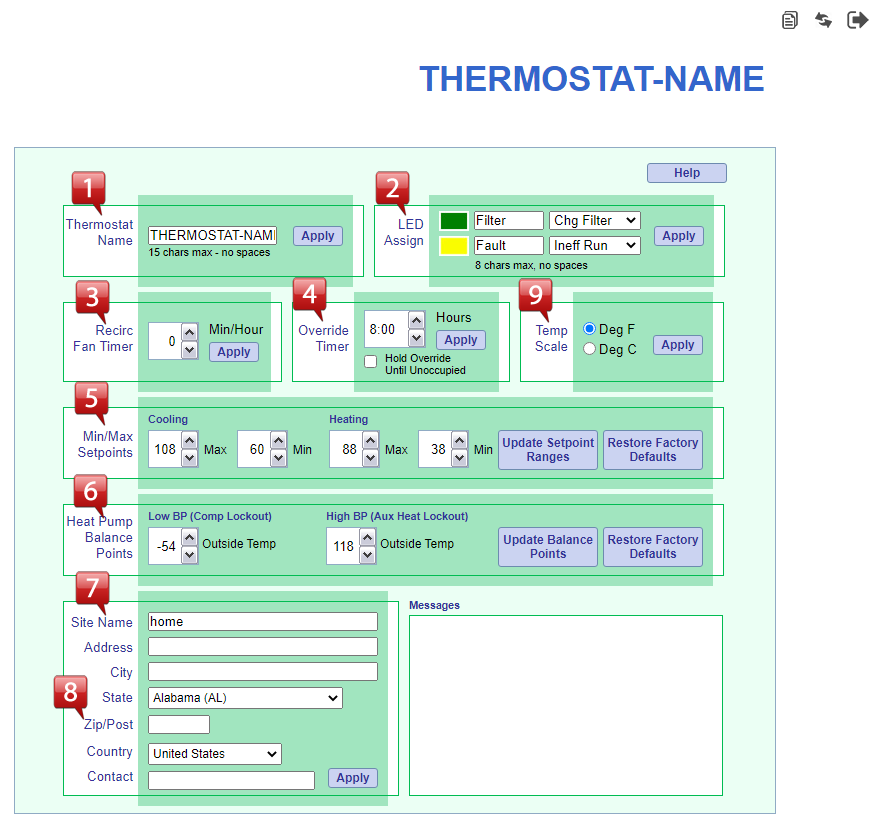
Thermostat Name: Enter a descriptive name for the thermostat. This can be any name up to 15 characters. Use A-Z, a-z, 0-9 and !@#$%^&*()/|-_ symbols. No spaces are allowed. This name will show up in the upper right-hand corner of each thermostat page. Click APPLY after making changes. |
 |
Input Alerts: The filter icon on the thermostat display may be turned on with the 'Chg Filter' alert if desired, and the wrench icon may be turned on with the 'Ineff Run' alert, if desired. The thermostat also allows the filter icon to be turned on when there is an alert input on the LED1 terminal, and/or the wrench icon to be turned on when there is an alert input on the LED2 terminal. Click APPLY after making changes. |
 |
Recirc Fan Timer: 0 minutes - 30 minutes. The recirculation feature turns on the fan to allow air to be recirculated, even if there is no call for heat or cool. The thermostat remembers the total number of minutes of cooling and/or heating every hour and turns on the fan for the remainder of the minutes selected. Use 0 minutes to disable this feature. Click APPLY after making changes. |
 |
Override Timer: 0 hours - 8 hours, in 10-minute increments. This sets the amount of time a setpoint override from the normal schedule is active. At the end of the override time, the normal schedule will resume. To completely remove setpoint adjustability from the front panel of the thermostat, set to 0 hours. Click APPLY after making changes. |
 |
Min/Max Setpoints: 60°F -108°F for Cooling, 38°F - 88°F for Heating are defaults. To restrict the setpoint range from the front panel of the thermostat, adjust these values. Click UPDATE SETPOINT RANGES after making changes, or RESTORE FACTORY DEFAULTS to remove the restrictions. NOTE: In Heat or Cool only mode, only the relevant set of setpoints will display. |
 |
Heat Pump Balance Points: The default settings of -54°F for the Low Balance Point (compressor lockout) and 116°F for the High Balance Point (aux heat lockout), leave the balance points 'disabled'. When used with Heat Pump equipment, the thermostat may be configured to disable the use of auxiliary heat during warm weather and to lock out the compressor when the outdoor temperature is too cold. At warmer temperatures, a heat pump will operate much more efficiently than the auxiliary heat. It can save energy to disable the auxiliary heat in some cases; for example, when returning from a setback on a mild day. The outdoor temperature above which auxiliary heat is disabled is the High Balance Point. Air-to-air heat pumps become less efficient as the outdoor temperature approaches freezing. The temperature at which it becomes more efficient to use auxiliary heat instead of the heat pump's compressor is the Low Balance Point. Click APPLY after making changes. NOTES:
|
 |
Site Location Info: Enter the installation location information here. Click APPLY after making changes. |
 |
Zip Code (Postal Code) Info: Enter the Zip Code (or Postal Code) in order to receive the current weather conditions and 7-day forecast. Click APPLY after making changes. |
 |
Temperature Scale: The temperature can be displayed as Fahrenheit or Celsius. This applies to all thermostat readings and adjustments, including alerts. Click APPLY after changing. |