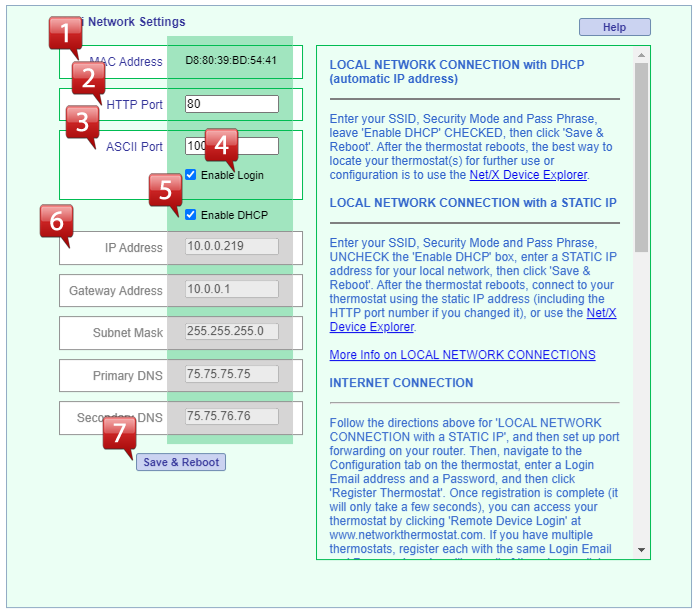
Network Settings
 |
MAC Address: This is the unique MAC address for the communication module. |
 |
HTTP Port: Port number for web page requests. This should only be changed by advanced users. The default is port 80. |
 |
ASCII Port: Port number for use with the Net/X Command Center software, if needed. This should only be changed by advanced users. The default is port 10001. |
 |
Enable ASCII Login: If this box is checked, login credentials are required for use of the NetX ASCII API and NetX-IP Command Center software. It is recommended that this box be checked. |
 |
Enable DHCP: For initial connection, leave this box checked. The DHCP server in the network's router will automatically assign an IP address, as well as all other information shown in #6. |
 |
NetX Thermostat IP Network Info: Shown 'grayed out' in the image above because this information has been set by the DHCP server. To manually change the IP address to a static address on the network, uncheck the DHCP box and change the IP address. Make sure that the static address entered is NOT within the DHCP range. The DHCP range can be found by logging into the router. NOTE: If a static address is desired, it is only necessary to enter the IP address. All other entries (Gateway, Subnet, Primary and Secondary DNS) are assigned by the router and should be left alone. These should only be changed by advanced users. |
 |
Save & Reboot: Click this button to save and reboot with the updated network information. CAUTION: Double-check each entry to make sure it is correct before clicking the button. If there is wrong information entered, reconfiguration of all network settings will be required. |