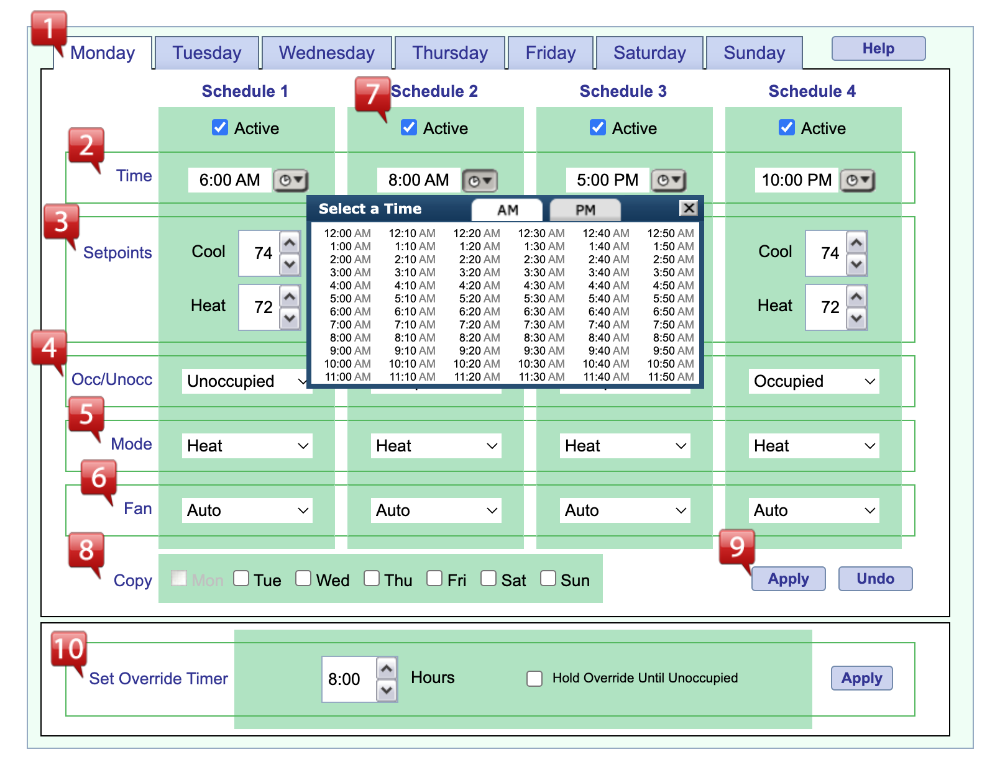
Schedule Settings
 |
Day of Week: The tabs across the top indicate the day of the week for the schedule that is being shown. |
 |
Time: Time for the start of the scheduled event. Either type the time or click the “Timepicker” button to use the pop-up window for setting the Schedule time. When Adaptive Recovery is ON, the thermostat will anticipate when to turn on the heating or cooling system prior to the start of a schedule in order to achieve the desired setpoint temperature by the beginning of the Schedule time entered. If Adaptive Recovery is OFF, the thermostat will engage the Setpoints, Occ/Unocc, Mode and Fan setting at the time indicated, and turn on the system as needed to maintain the setpoint. |
 |
Setpoints: Set the Cooling and Heating setpoints to be used for each schedule. NOTE: In Heat or Cool only mode, only the relevant setpoint will display. |
 |
Occ/Unocc: Sets the thermostat mode into an OCCUPIED or UNOCCUPIED mode for each schedule. This is a valuable feature to be used in conjunction with the keypad lockout. If ON, the keypad lockout is active and a setpoint adjustment from the front panel of the thermostat will place the thermostat into OVERRIDE mode. In OVERRIDE, the thermostat front panel is restricted to either an adjustable amount of ±2°F(±1°C) to ±8°F(±4°C) range from the scheduled setpoints, as defined in the HVAC settings. At the time of the front panel setpoint change, if the current schedule is OCCUPIED, then the available adjustment will be from the current setpoints. If the current schedule is UNOCCUPIED, the thermostat will revert to the most recent OCCUPIED setpoints and the allowable adjustment range. At the end of the OVERRIDE period, the schedule will revert to the appropriate schedule based on the current time. |
 |
Mode: Allows schedules to be set for AUTO (auto-changeover between heating and cooling), COOL, HEAT, or OFF. It is NOT recommended to schedule an OFF mode in extremely hot or extremely cold weather. As additional protection, the thermostat has a built-in 38°F low-temperature control, which will cycle the system to keep a minimum of 38°F, even in the OFF mode. NOTE: In Heat or Cool only mode, Auto Mode will not display. |
 |
Fan: Allows each schedule to have the fan in AUTO (fan cycles with the system calls, or ON (fan stays on continuously during the scheduled event). |
 |
Active/Inactive Schedule: The thermostat allows for up to four (4) scheduled events every day, but in some cases, that is too many. To reduce the number of schedules needed, simply uncheck the ACTIVE box and that schedule will be ignored. NOTE: All schedules MUST be in chronological time from left to right (even when a schedule is “inactive.” |
 |
Copy: To copy a schedule from the current day to any other combination of days, check each day of the week needed, and click APPLY. |
 |
Apply & Undo: APPLY saves the schedules for immediate use, and UNDO reverts to the current schedules if clicked before the APPLY button is clicked. |
 |
Override Timer: 0 hours - 8 hours, in 10-minute increments. This sets the amount of time a setpoint override from the normal schedule is active. At the end of the override time, the normal schedule will resume. To completely remove setpoint adjustability from the front panel of the thermostat, set to 0 hours. Click APPLY after making changes. |